Module 5: Layer 2: Orchestration
What gives the orders. Workflows that retry, wait for free, and show exactly what broke.
Everything in this module
The full walk-through of the video, to read at your own pace. Any term that has a glossary entry is linked; hover it for a quick definition.
Layer two: orchestration. The layer that gives the orders. This is the layer that lists the steps, runs them in order, retries what fails, and shows exactly where something broke.
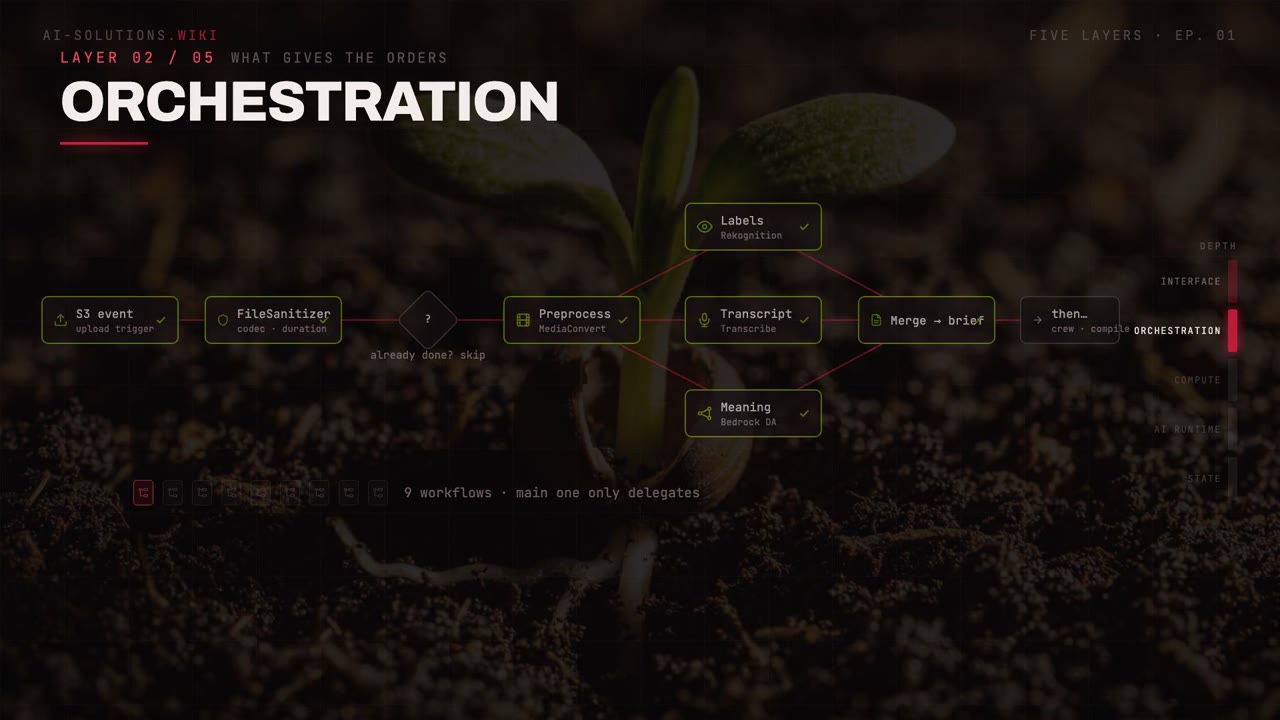
The recipe the computer follows
The moment a file lands in storage, an event fires, and a Step Functions workflow wakes up. Think of it as a recipe the computer follows, step by step. It lists every step, runs them in order, retries what fails, and shows exactly where something broke.
 File sanitizerchecks codec, container, duration
 Preprocesshands off to MediaConvert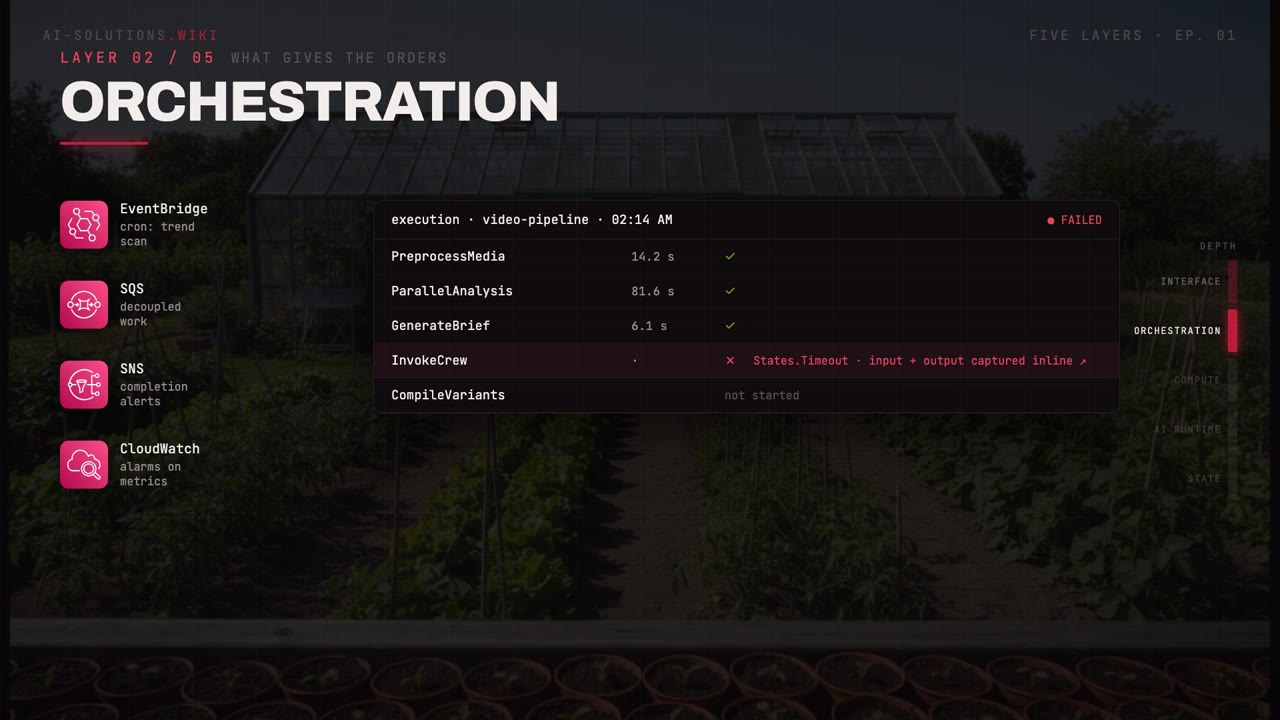
Nine workflows, and the main one only delegates
VideoFlow runs nine of these workflows. The main one drives the whole pipeline, and it never does any work itself. It only delegates. The orchestrator is a conductor, not a worker. It decides what happens next and hands each task to the layer below.
The zero-compute poll
Here is the pattern that makes it cheap. To wait on a slow job, the workflow asks: are you done? If not, it pauses. Completely.
Nothing runs during a Wait state. Polling a transcription job costs zero compute.
One pattern, reused for Transcribe, Bedrock Data Automation, and MediaConvert. Every slow job in the system waits the same free way.
Orchestration is also where time lives
EventBridge fires the schedules, queues decouple the work, alarms watch the metrics.
 EventBridgefires the schedules
 Alarmswatch the metrics
When it fails at 2 a.m., no log hunting
And when something fails at 2 a.m., the execution history shows every state with its input, its output, and the exact error, inline. No log hunting. You do not go digging through scattered logs to find the failure. The failed state is right there, with what went in, what came out, and the exact error.
An assembly line where every station is visible, and the conveyor belt itself is free.
But orders are nothing without workers. Layer three.
Concepts in this module
Services and tools in this module
AWS Step FunctionsHow Step Functions orchestrates multi-step AI workflows, handles retries and …
Amazon EventBridgeAmazon EventBridge is a serverless event bus that routes events between AWS …
Amazon CloudWatchUsing Amazon CloudWatch for AI workloads: custom metrics for LLM cost and token …
AWS Elemental MediaConvertUsing AWS Elemental MediaConvert for transcoding, format conversion, and video …Keep going
Look up any term in the glossary, or build a system like this with the build guides and a hands-on workshop.