Graphical User Interface (Apple Macintosh)
The first commercially successful personal computer built around a graphical user interface and mouse, launched in 1984, and the model for almost every screen you touch today.
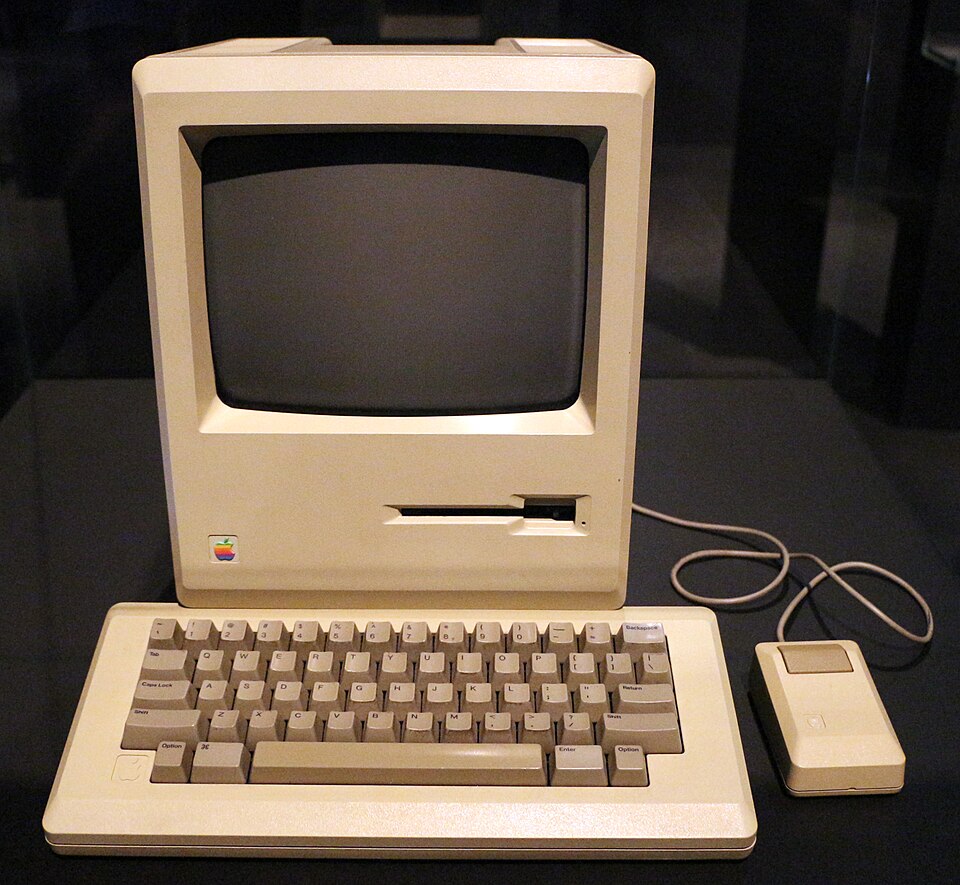
The Apple Macintosh was a personal computer that Apple launched on 24 January 1984. It was the first commercial success built entirely around a graphical user interface and a mouse. Instead of typing cryptic commands, you pointed at windows, icons, and menus and clicked. That model turned the computer from an expert tool into something an ordinary person could use, and it still shapes nearly every screen today.
What it was
A graphical user interface, or GUI, is a way to control a computer with pictures instead of typed commands. You see windows, small pictures called icons, drop-down menus, and a pointer you move with a mouse. You click, drag, and point to get work done. Before this, most computers showed a blank text screen. You had to know the exact words to type, or nothing happened.
The Macintosh put this on a desk for a wide audience. The screen showed a desktop with file icons and folders. A single-button mouse moved the pointer. You opened a document by clicking it, dragged a file into the trash to delete it, and chose actions from menus at the top of the screen. The metaphor was an office desk, so a new user already understood the basic idea.
Think of the difference between a phone with a keypad and a touchscreen map. The old text computer was like calling a service and reciting a code from memory. The Macintosh was like looking at a map and tapping where you want to go. You did not need to remember the syntax. You could see your options and point at them.
This loop of point, click, act, and see is the heart of direct manipulation. You handle objects on screen as if they were real things. Every desktop interface since copies the same cycle.
Why it mattered
The Macintosh proved that a computer could be friendly. It showed that everyday people, not only trained operators, would use a machine if the controls made sense on sight. That idea reshaped the whole industry and grew the market far beyond hobbyists and offices.
It set the standard for how software looks. Menus along the top, windows you can move and resize, icons for files, and a pointer you steer with a mouse became the common language of computing. A user who learned one program could guess how the next one worked, because they shared the same shapes and gestures.
It also pushed rivals to follow. Microsoft built Windows around the same concepts, and the GUI became the default for personal computers everywhere. The lineage runs back through the IBM PC era and the wider drop in chip cost that Moore’s Law tracked, which made powerful, affordable graphics possible.
How it connects to AI today
The Macintosh defined how humans and machines meet on a screen, and that interface is exactly where most people meet AI. When you open ChatGPT, Claude, or any AI tool, you click a window, type into a box, and read the reply in a panel. The windows, pointers, and menus around the AI all descend from the 1984 design. The interface is invisible because it works, but it is the same direct-manipulation model.
The deeper link is the principle, not the pixels. The Macintosh hid the machine’s complexity behind a clear, visible surface. Modern AI extends that idea to language. A chat box lets you state intent in plain words, and the model handles the messy steps underneath. Both shifts move effort from the person to the machine, so a non-expert can do expert work.
A builder meets this heritage in concrete ways. Every web and mobile app you ship sits on the windows, buttons, and pointer events that the Macintosh standardised. When you design an AI feature, you choose how the user invokes it: a button, a menu, a side panel, a cursor that follows the text. Those are GUI decisions. AI coding assistants live inside this surface too. You point at a line, open a panel, and accept a suggestion with a click, the same gestures from 1984 now carrying an AI underneath.
There is also a clear next step. The GUI replaced typed commands with pointing. Conversational AI is adding a layer where you describe a goal and the system assembles the clicks for you. The interface keeps moving closer to human intent, and the Macintosh was the first mass-market jump along that path.
Still in use today
The graphical user interface is fully active and is the dominant way people use computers. The original 1984 Macintosh hardware is a collector’s item and a museum exhibit. Its interface, though, never stopped evolving. Apple’s current operating system, macOS, descends in a continuous line from that first machine.
The GUI also spread far beyond Apple. Windows, Linux desktops, smartphones, tablets, car dashboards, and kiosks all use windows, icons, menus, and a pointer or a finger. Touchscreens adapted the model for direct touch instead of a mouse, but the core idea, manipulate visible objects on a screen, is the same one the Macintosh popularised.
The text command line did not vanish, and that is worth noting. Engineers still use terminals for speed and automation, and AI agents often act through command-line tools. The two styles coexist. For nearly everyone else, though, the graphical interface is computing. Four decades on, the Macintosh model is not legacy. It is the default.
Further reading
- IT History Timeline : see where the Macintosh sits in the wider story of computing.
- AI Learning Galaxy : explore how interfaces connect to modern AI and machine learning.
- IBM PC : the rival personal computer standard that the Macintosh challenged with its interface.
- Moore’s Law : the chip-cost trend that made affordable graphical computing possible.
- Apple Macintosh on Wikipedia : the launch model, its specifications, and its history.
- Xerox Alto on Wikipedia : the 1973 research machine where the GUI began at Xerox PARC.
- Computer History Museum on the graphical user interface : primary-source context on the Alto and the origins of the GUI.
Frequently asked questions